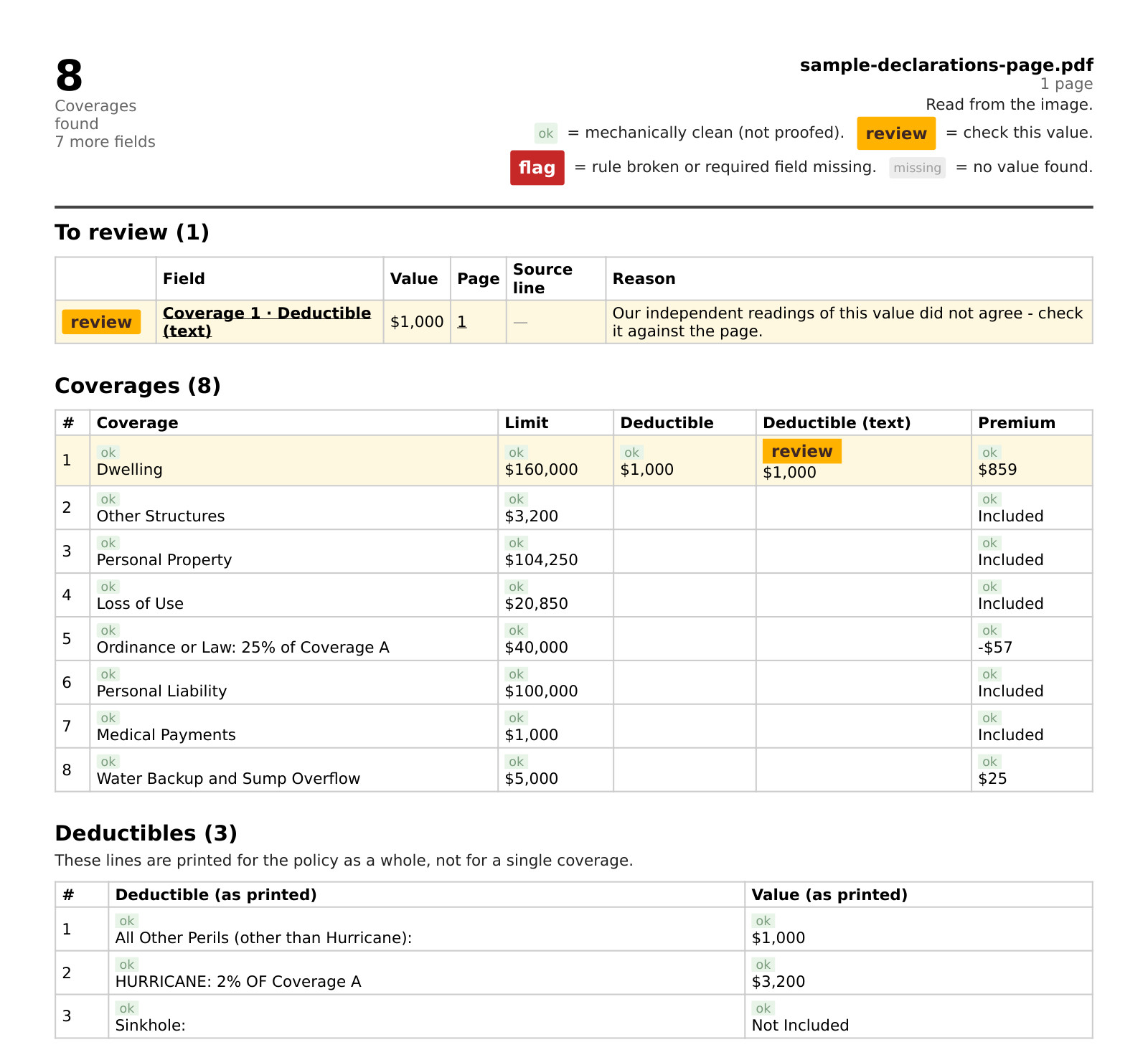
What lands in the spreadsheet
You email a US declarations page, as a PDF or a phone photo. Usually within a few minutes the reply brings two files:
- A CSV you open in Excel or Google Sheets: the coverages with their limits, deductibles and premiums, plus key fields such as insurer, named insured, policy number and total premium.
- A PDF sheet with the same values and a mark on each one: ok, review, flag or missing. Anything that needs a look is listed first, with the reason and where on the page to check it.
The two belong together: the CSV is for working with the numbers, the sheet tells you which of them to check before you rely on them.
Why not copy and paste, or a PDF-to-Excel converter?
A converter turns the page layout into cells. On a dec page that gives you labels in one column, amounts drifting into the next, and a hurricane deductible split across three rows — every carrier lays the page out differently. You still have to rebuild the table yourself, and a phone photo rarely converts into anything usable.
DecTrace reads what the page means instead of where the ink sits: each coverage becomes one row with its limit, deductible and premium. Each page is read three times independently; where the readings disagree, the value is marked for review instead of passed along as if it were certain.
Where agents use it
- Comparison spreadsheets when you remarket a renewal or quote a new client against their current program.
- Feeding your own templates without re-keying — paste the CSV rows where you need them.
- A record of what the client had before you changed anything, from the PDF or photo they sent.
What it does not do
DecTrace structures what the document says; it does not interpret coverage or tell you whether a loss is covered. It has been tested mostly on homeowners declarations pages. Multi-page commercial policies are read, but often come back marked as not reliable enough, and we tell you that instead of guessing. Send one of yours free and look at the result before you rely on it.
Price
Your first page is free, with no account and no call. After that it is $49 a month for independent agents and small agencies, five documents per email and 1,000 pages a month included, cancel anytime. Pricing details · How we handle your clients' data