The sheet you get back
The Florida regulator’s public sample declarations page, run through DecTrace. This is the sheet as it arrives — a PDF, not a mockup. The top of it: See the full output →
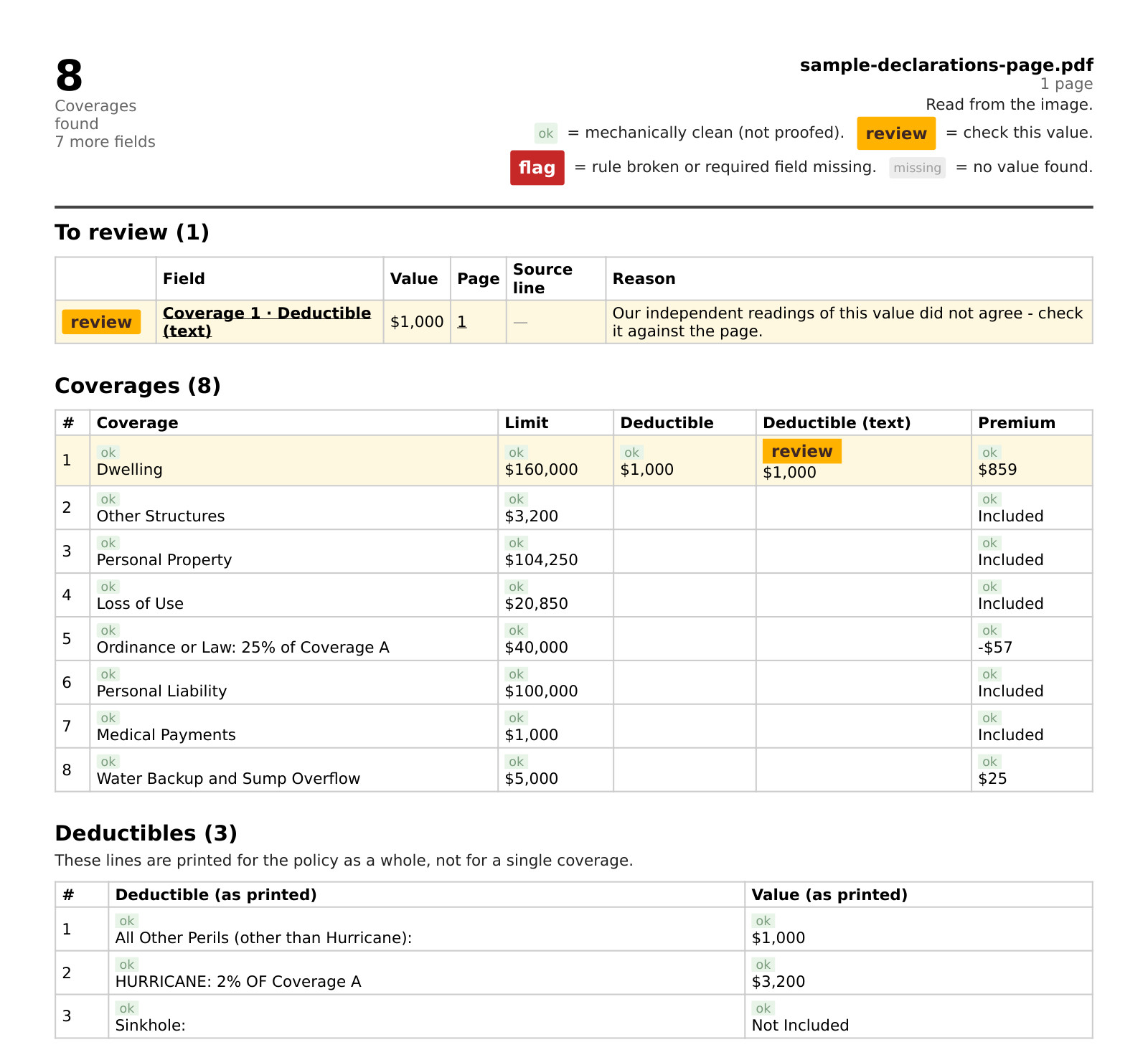
Upload or email a US declarations page. You get back every coverage, limit, deductible and premium as a table. Anything the engine is not sure of is listed first, with the page to check — and the exact line wherever the file carries text — so you verify in seconds instead of re-reading the PDF.
See a real dec page, run through it →
Your first page is free — no account, no call. Then $49/mo, cancel anytime.
| Coverage | Limit | Premium |
|---|---|---|
| okDwelling | ok$160,000 | ok$859 |
The machine reads and marks its own work. Most rows come back clean; the ones that do not are listed first, with where to look.
A PDF or a phone photo, up to five at a time — upload them here or attach them to an email. A page we cannot read comes back saying so — it is not guessed at.
Usually within a few minutes, as a PDF: coverages, limits, deductibles and premiums in one table, each value with its mark.
Anything marked for review sits at the top of the sheet. That is where your minute goes.
40 seconds, start to finish. Shown: a public sample declarations page, not customer data.
A photographed page, a smudged number, a column that shifts halfway down — the engine can misread those like any other. What it does not do is hide it: a value it is unsure of is marked and shown with the page it was read from — and the line, where the file has one — so you can check it against the document instead of trusting us. And a page we genuinely cannot read comes back saying exactly that, with what to change — not as a confident-looking sheet.
If a coverage limit is copied wrong, it lands on your desk, not on the machine’s. That is the point of the review step.
One row per coverage, limit and deductible side by side — a table you read values off, not a paragraph you re-parse.
Every row marked for review, and the policy number, insurer, named insured and total premium, show the page and line they were read from. Where a value has no line to point to, the source column stays empty — it never shows you something plausible instead.
A value it is not sure of is marked, not slipped in quietly. The sheet tells you what to spend your minute on.
ok = read and parsed, not proofed. review = look at this one. flag = a rule broke or a required field is missing. missing = no value found. An empty cell is never marked ok. You decide; the machine points.
One product, one price — for independent agents and small agencies. Ten minutes saved on each of twenty pages a month is more than three hours, for $49.
Your clients’ data. Used only to build your sheet — never sold, never used for advertising. The working copy is deleted once your sheet is delivered; an upload leaves no copy of the document behind. The page is read through our AI provider, Nous Research, with Privacy Mode on — by its own terms it does not store the content or train on it. Need a data processing agreement? We will sign one. How we handle it
Cancel anytime on your billing page — no email to us needed. After you subscribe, upload your pages with the address you subscribed with, or email them to docs@dectrace.com, and the checked sheet comes back as a PDF, usually within a few minutes — longer when several land at once. No account, no login.
US declarations pages. So far we have tested it mostly on homeowners dec pages. Auto and commercial pages go through the same engine, but we have tested far fewer of them — send one free and look at the sheet before you rely on it.
It reads the page itself, not a carrier template, so there is no list of supported carriers. A layout it has not seen before is exactly where the review marks earn their keep.
Up to five documents per upload or email, up to ten pages each, and 1,000 pages a month included — every page counts once, so a two-page document counts as two. If you have the whole policy, send just the declarations pages. When a lot arrives at once the queue runs longer.
Yes. One subscription covers one agency: anyone in it can send from an address on your agency’s own domain, or from addresses we add for you. A network or service firm that works for several agencies needs one subscription per agency or a volume plan — write to us.
No. DecTrace types out what the document says; it does not interpret coverage. The judgement stays with you.
It is used only to build your sheet, never sold and never used for advertising. The working copy is deleted once your sheet is delivered, and the sheet itself after at most seven days. An upload is deleted from our storage once your sheet is built, and after one day at the latest; if you email instead, your email stays in our mailbox until you ask us to remove it. The page is read through Nous Research with Privacy Mode on, which by its own terms does not store the content or use it for training. If you need a data processing agreement, write to us and we will sign one before you send anything. Details are in the privacy notice.
On your billing page: enter the email you subscribed with, confirm the code Stripe sends you, cancel. No email to us, no reason needed. See refunds.
DecTrace is built and run by Christian Burkardt in Zweibrücken, Germany. Questions go to him directly: christian.burkardt@dectrace.com.